How It Works
A technical overview of how Hamburg transforms your module selections into a native iOS app on TestFlight.
What is Hamburg?
Hamburg is a platform that lets you build and publish custom iOS apps to TestFlight without writing code or managing Xcode. Select the features you need, and we handle everything else.
- Select modules from our curated collection
- No Xcode or development experience required
- Publish directly to your own TestFlight
The Big Picture
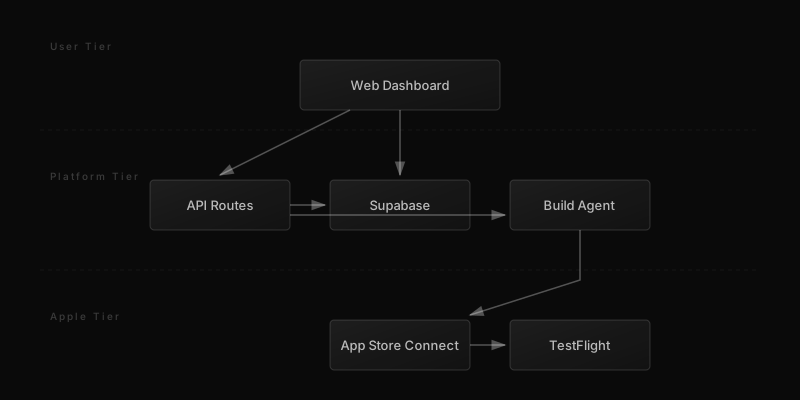
Hamburg consists of three tiers working together to turn your module selections into a real iOS app: a web dashboard where you work, a build system where the magic happens, and Apple's services where your app lives.
User Authentication
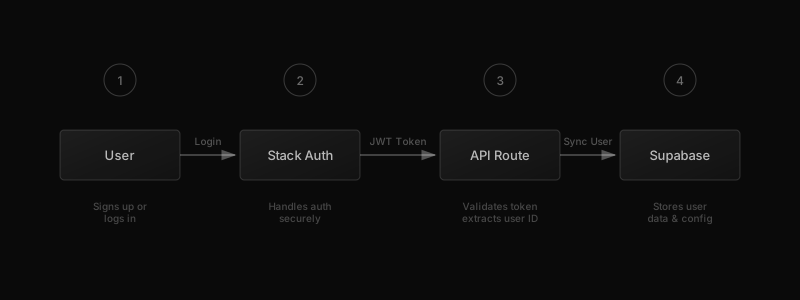
When you sign up, Stack Auth handles your login securely. Your user profile is then synced to our Supabase database, where we store your app configurations and encrypted credentials.
- Stack Auth handles sign-up and login
- User data synced to Supabase
- All credentials encrypted at rest
The Module System
Each module in Hamburg is a Swift Package that adds specific functionality to your app. At build time, we use compilation flags to include only the modules you selected, keeping your app lean and focused.
- Each module is a self-contained Swift Package
- Modules are included or excluded at build time
- Your app's tab bar is generated from enabled modules
- Choose up to 5 modules per app
The Build Pipeline
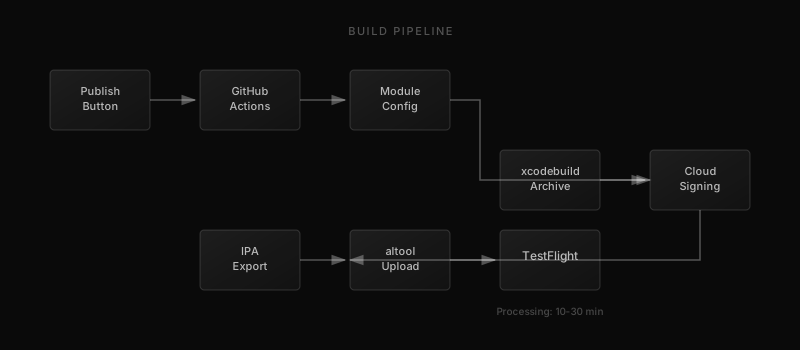
When you click Publish, a GitHub Actions workflow springs into action on a macOS runner. Your module configuration is applied, the app is compiled with xcodebuild, signed with your credentials, and uploaded to TestFlight.
Code Signing Made Simple
Apple requires all apps to be cryptographically signed before they can run on devices. Hamburg uses cloud signing, where Apple manages certificates for you through App Store Connect. You just provide an API key, and we handle the rest.
- Apple requires apps to be signed with certificates
- Cloud signing lets Apple manage certificates for you
- You provide an API key, we handle the technical details
- No need to manage certificates or provisioning profiles
App Store Connect Integration
Hamburg uses a combination of Apple's App Store Connect API and Fastlane to manage your apps. While the ASC API handles most operations, Apple doesn't allow creating new apps through the API alone. That's where Fastlane comes in—it's an open-source tool that automates iOS deployment tasks, and we use it specifically to create your app record in App Store Connect using your Apple ID credentials.
- Fastlane creates the app record in your Apple account
- ASC API creates bundle identifiers and capabilities
- Your Apple ID is used once for app creation, then stored securely
- Subsequent builds use the API key for uploads
- We only request the minimum permissions needed
TestFlight Delivery
Once the build is uploaded, Apple processes it for TestFlight distribution. This typically takes 10-30 minutes. After processing, your testers can install the app directly from the TestFlight app on their devices.
- Build uploaded to Apple for processing
- Processing takes 10-30 minutes
- Testers install via the TestFlight app
- Manage tester access from your dashboard
Real-Time Progress
Throughout the build process, you see exactly what's happening. Our progress timeline updates in real-time without needing to refresh the page. If something goes wrong, you get clear error messages explaining what happened and how to fix it.
- Progress timeline shows each build step
- Updates appear instantly, no refresh needed
- Clear error messages if something fails
- Retry failed builds with one click
Technologies Used
Hamburg is built with modern, battle-tested technologies. The web dashboard runs on Next.js with React, styled with Tailwind CSS. Authentication is handled by Stack Auth, while Supabase provides the PostgreSQL database with row-level security. The iOS app is pure UIKit with Swift Package Manager for modularity. Builds run on GitHub Actions with macOS runners, using xcodebuild for compilation and Fastlane for Apple integrations.
- Next.js 15 with App Router and React Server Components
- Tailwind CSS for styling, Supabase for database
- Stack Auth for secure authentication
- UIKit and Swift Package Manager for iOS
- GitHub Actions with macOS runners for CI/CD
- Fastlane for Apple ID authentication and app creation
- App Store Connect API for builds and TestFlight uploads